
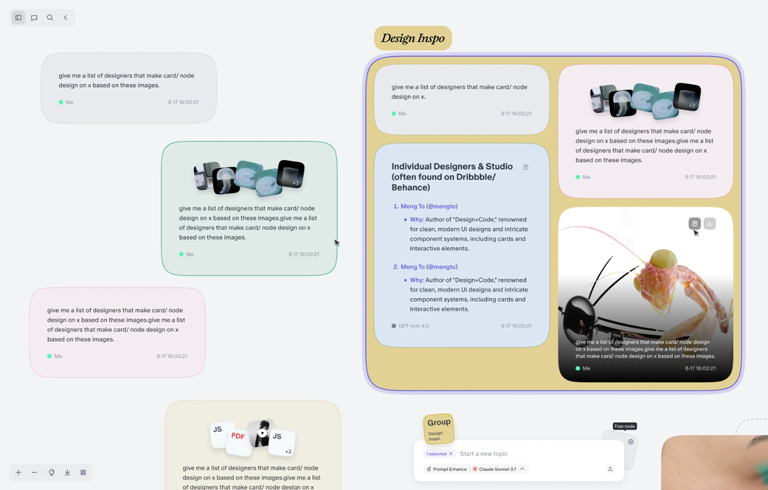
Human masterpieces have always started on a canvas, not in a chat window. Think of Da Vinci’s sketches or a writer’s storyboard; creation requires space to breathe, branch out, and evolve. Yet, for too long, we have settled for linear, restrictive “one-question-one-answer” interactions with tools like ChatGPT or Gemini. This linear format stifles the complexity of human thought. Enter Flowith, which transforms the rigid chat interface into the Context Playground—a fully free-form canvas designed to merge, diverge, and deepen your ideas. Flowith isn’t just an AI tool; it is a dynamic workspace where you build context like stacking blocks, ensuring that your vision is generated with precision, not just predicted by probability.
The Problem with Linear Chat: Why We Need a Canvas
To understand the revolutionary nature of the Context Playground, we must first address the limitations of the status quo. The sAI interface—a scrolling wall of text—is fundamentally flawed for complex problem-solving. As you interact with a traditional bot, the conversation grows longer, and the “context window” (the amount of information the AI can “remember” at once) becomes cluttered.
This clutter leads to the dreaded “AI hallucination.” As tasks grow longer and more complex in a linear chat, the AI struggles to separate crucial instructions from earlier, irrelevant chitchat. It begins to lose the plot, offering generic or incorrect answers. Users are forced to restart threads, copy-paste prompts, or accept mediocre output. The linear format forces you to think in a straight line, but human creativity is a web, a map, and a network. Flowith brings the interface in line with how your brain actually works.
The Context Playground: An AI Imagination Canvas
The core of Flowith’s innovation is the Context Playground. It is designed specifically to minimize AI hallucination and r you to generate with precision.
In Flowith, interaction is not a waterfall of text; it is a construction project. You build your context “like stacking blocks.” This modular approach allows you to compartmentalize information. If a specific block of context becomes too long or unwieldy, you don’t have to delete your whole history. You can simply trim that specific block, refine it, and ensure the AI focuses only on what matters. This results in sharper, more precise generation that stays true to your original intent.
Edit Nodes: Rewriting AI’s Memory
One of the most powerful features within the Context Playground is the ability to Edit Nodes. In a standard chat, if an AI gives you a 90% perfect answer with a 10% error, you often have to re-prompt it, risking that the new answer fixes the error but breaks the good parts.
With Flowith, you have full context control. You can open the output editor and directly modify the AI’s answer. You keep what’s good and fix the rest. By deleting unnecessats, correcting errors, and polishing the text manually, you are effectively editing the AI’s memory. When you continue asking questions based on this optimized node, the AI is working from a foundation of truth that you have verified. This “human-in-the-loop” editing ensures that errors don’t compound over time. Furthermore, these edited key insights can be seamlessly added to your Knowledge Base for future use.
Cut and Connect: The Surgeon’s Scalpel for Context
Relationships between ideas are just as important as the ideas themselves. In Flowith, the connections between nodes are visible and editable.
If you hover your mouse over any link between nodes, you will see a scissors icon. This tool is your best defense against “AI junk.” It allows you to sever links that carry irrelevant context or low-quality outputs. By cutting these links, you stop the bad data from polluting your future generations. Conversely, you can reconnect high-value nodes that were previously unlinked. This allows you to td together the best parts of a brainstorming session while discarding the fluff, keeping only the truly useful parts for your follow-up inquiries.
Playful Interaction: Explore Infinite Ideas
Creativity is rarely a straight path; it is a process of exploration. The Context Playground is designed to let you explore and play with your infinite ideas through a suite of intuitive interaction tools.
Duplicate Nodes: The Freedom to Diverge
We have all experienced the “fork in the road” moment. You have a great idea, but you see two different ways to develop it. In a standard chat, you have to choose one path and abandon the other, or risk confusing the bot by trying to do both.
In Flowith, when a brilliant spark appears, you simply right-click to duplicate the node. This allows you to diverge your idea, exploring a new direction in a parallel branch without ever losing the original spark. You can A/B test different prompts, tones, or strategies side-by-side on the same canvas.
Group Nodes: The Power to Merge
Just as ideas need to diverge, they also need to converge. Great insights often come from combining two unrelated concepts. Flowith makes this effortless.
By holding down Shift to drag-select or clicking multiple nodes, you can multi-select distinct ideas. With a simple right-click, you can Group Nodes. This merges them, carrying over the context from all selected nodes to use as a shared input for your next conversation. This is incredibly powerful for synthesis—imagine taking a node containing “Market Research” and a node containing “Product Specs” and grouping them to generate a “Launch Strategy.”
Batch Mode: Deepening the Well
Sometimes, the first answer isn’t the best answer. Batch Mode allows you to deepen your ideas by generating multiple answers to the same direction simultaneously. Instead of settling for the first draft, you can request three or four variations, compare them side-by-side on the canvas, and choose the answer you like best to proceed with.
Visual Organation: Color and Flow
A messy canvas can be just as confusing as a messy chat. Flowith provides Customized Colors to help you highlight important nodes fast. You can color-code branches of thought (e.g., make all “Creative” nodes blue and all “Technical” nodes red) and change canvas themes to suit your mood.
Furthermore, the Free Dragging capability means your ideas are no longer bound to a fixed position. You can rearrange the logic of your conversation visually. And if things get too chaotic? The One-Click Layout button (located at the bottom left) instantly reorganizes your canvas, tidying up your nodes so you can step back and see the big picture.
The All-in-One Multimodal Creation Space
The era of text-only generation is ending. The Context Playground is a true multi-media canvas.
Flowith allows you to combine multiple large models for multimodal generation. You are not limited to writing; you can produce text, generate images, create videos, write code, build 3D models, compose audio, design slides, and even prototype websites.
Because this happens on a canvas, these different media types can coexist and interact. You can have a node with code next to a node with a generated UI image, flowing into a node with marketing copy. It is an all-in-one creation space that removes the friction of switching between different single-purpose AI tools.
Conclusion: A New Paradigm
Flowith is not just an upgrade to the chatbot; it is a fundamental rethinking of how humans and AI collaborate. By moving from a linear feed to a Context Playground, we regain control over the chaos. We can minimize hallucinations through precise context management, diverge and merge ideas with playful interactions, and organize our thoughts in a visual, multimodal space.
It is time to stop chatting and start creating.