
Seedance 2.0 has landed on Flowith.
ByteDance’s most powerful video generation model — the one that ships every clip with synchronized sound design, the one that made Hollywood studios send cease-and-desist letters because the output was too real — now lives natively inside the Flowith canvas.
This isn’t just another model integration. When Seedance 2.0 meets a spatial, multi-model workspace, video creation stops being a isolated generation task and becomes part of a living creative flow.
Select it in video mode.
Feed it your vision.
Watch it move.
What Makes Seedance 2.0 Different
- Ultra-realistic audiovisual experience — Outstanding motion stability and physics fidelity, paired with native audio-video synchronization, delivering an immersive, true-to-life cinematic feel.
- Director-level control over every frame — Supports audio, video, and image as multimodal reference inputs, breaking the boundaries between assets and giving creators full command over performance, lighting, and camera movement. Unmatched controllability turns creative intent into visuals — generate like a director.
- Production-pipeline ready — Purpose-built for advertising, film, and social media marketing workflows. Output quality meets industrial delivery standards, dramatically cutting VFX and live-shoot costs while delivering significant efficiency gains across the pipeline.
How to Use Seedance 2.0 on Flowith
Using Seedance 2.0 on Flowith is straightforward:
- Open Video Mode — Navigate to the video generation interface within your Flowith workspace.
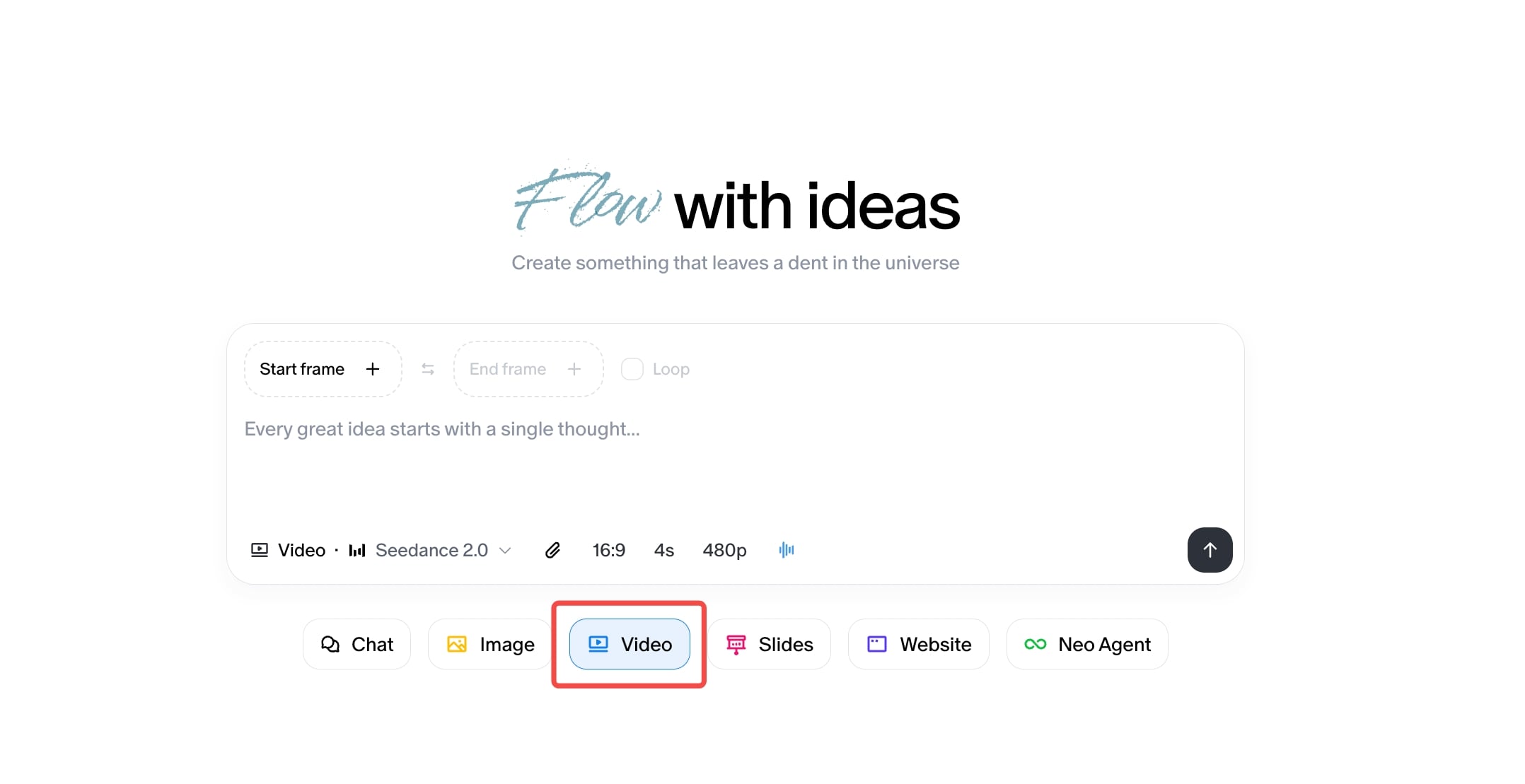
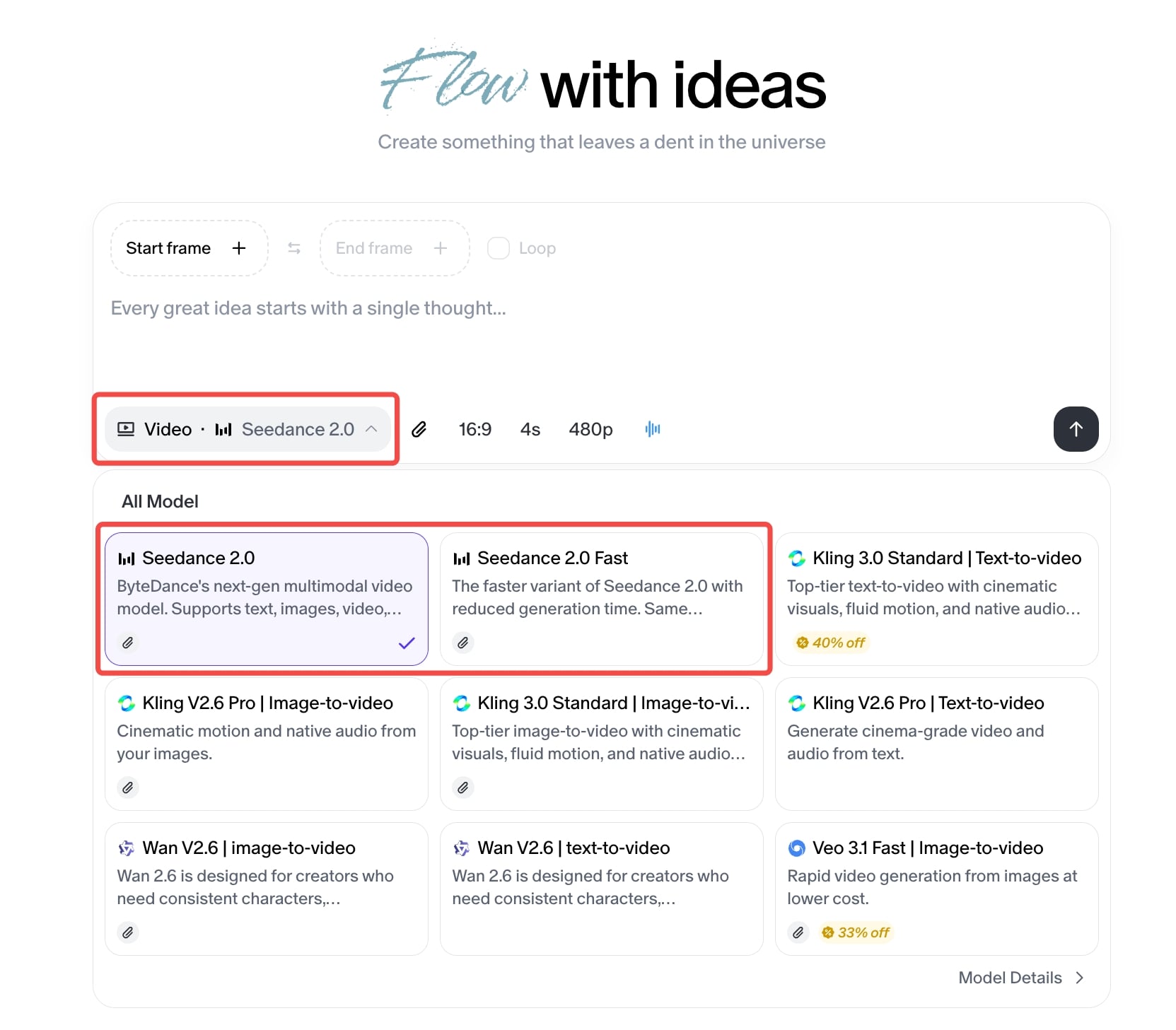
- Select Seedance 2.0 — Choose Seedance 2.0 from the available model list. It sits alongside other video generation models, but its multimodal capabilities set it apart.
-
Compose Your Input — This is where Seedance 2.0 shines. You can:
- Write a text prompt describing your scene
- Upload reference images for characters, environments, or style
-
Generate — Hit generate and let the model synthesize your inputs into a cohesive video clip with synchronized audio.
-
Iterate on the Canvas — Because this is Flowith, your generated video lives on the canvas alongside your other work. Branch it. Compare outputs side by side. Feed the result back as a reference for the next generation. The spatial workspace turns video generation from a one-shot gamble into an iterative creative process.
The key difference from using Seedance 2.0 on other platforms: context persists. Your generated videos, reference materials, and prompt iterations all coexist in your workspace. Nothing disappears into a chat scroll. Everything stays visible, connected, and reusable.
Example Prompts and Results
Below are example prompts that demonstrate Seedance 2.0’s range. Each shows a different facet of the model’s capability — from narrative action to subtle character animation to commercial-grade production.
Example 1: Modern Dance Video
Prompt:
“Generate an advanced modern dance video clip. The dance style and movements should emulate modern dance pioneer Isadora Duncan, with fluid body movements and natural expression, conveying emotions of thriving vitality and renewed vigor. The video background should feature high-end indoor cinematography with a predominantly black-and-white color palette. The dancer is a European male wearing sunglasses and dressed in a suit.”
What This Demonstrates: Fluid human motion with expressive body language — one of the hardest challenges in AI video. The model captures the organic weight and momentum of modern dance, maintains consistent character appearance (sunglasses, suit), and renders a cinematic black-and-white palette without losing depth or contrast.
Example 2: Perfume Ads
Prompt:
“The high-end perfume bottle, surrounded by a thin layer of water and delicate white flowers, slowly rotates 360 degrees around its vertical axis. Water wave rings gently spread out, adding a serene and luxurious feel to the scene. The camera captures the bottle’s elegant design and the light reflecting off the water and flowers, enhancing the overall opulence.”
What This Demonstrates: Product-grade commercial output. The model handles precise 360-degree rotation, realistic water physics with expanding wave rings, light refraction through glass and liquid, and delicate floral elements — all while maintaining the premium, luxurious mood demanded by high-end advertising. This is the kind of clip that goes straight from generation to a pitch deck.
The Bigger Picture: Video on the Canvas
Seedance 2.0 is not an isolated feature drop. It’s a piece of something larger.
Inside Flowith, video generation sits alongside text, images, research, and autonomous agents on a single spatial canvas. This matters because creative video work is never just video work. It’s concept art feeding into storyboards feeding into generated clips feeding into revised scripts. It’s a director’s vision expressed across formats simultaneously.
Traditional AI video tools force you into a tunnel: prompt in, video out, start over. Flowith’s canvas model means every generated clip becomes a node — something you can branch from, compare against, annotate, and feed back into the next creative iteration. The model remembers. The workspace remembers. Your creative momentum compounds instead of resetting.
This is what it looks like when AI video generation escapes the chatbox and enters a habitat designed for how creative minds actually work: spatially, iteratively, and across media.
Getting Started
Seedance 2.0 is available now in Flowith’s video mode. Select the model, compose your multimodal input, and generate.
Whether you’re prototyping a commercial concept, building a storyboard with generated reference footage, or exploring what a scene looks like from a different angle — the model is ready, and the canvas is waiting.
Start creating at flowith.io.
Ready to create with Seedance 2.0?
Open Flowith, select Seedance 2.0 in video mode, and turn your ideas into cinematic reality — in seconds.